

VegasNow Casino Registration – Opening an Account from Canada
Vegasnow Casino registration is an online form that creates one personal account per player. The process is open to adults aged 18 or over and takes a few minutes if the required details are prepared in advance.
This page explains each step of the VegasNow Casino sign up on desktop and mobile, the data the form requests, how verification works, and what to do if the form does not go through.
Step-by-Step VegasNow Casino Sign Up
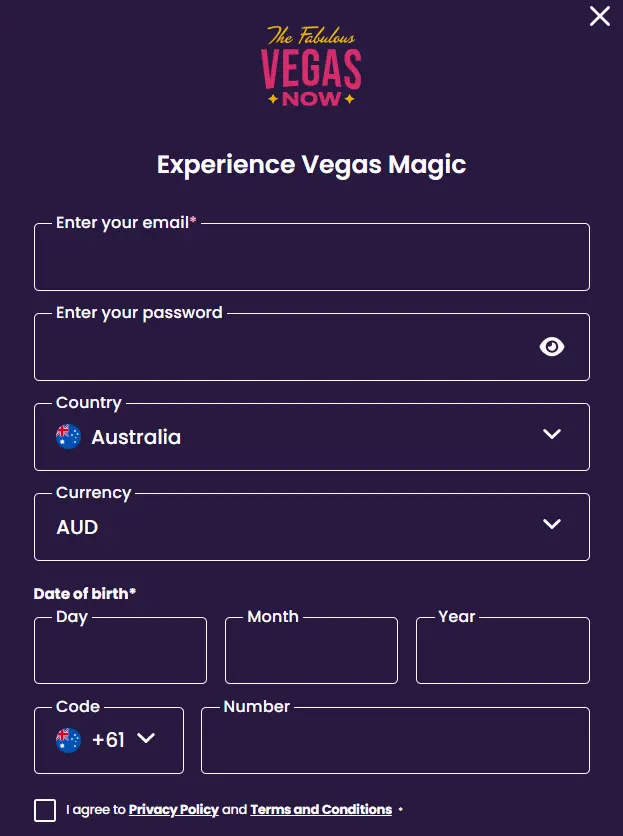
The VegasNow Casino sign up starts from the main page of the official site. The form collects personal and contact data, then creates the account and opens the cashier. No deposit is required to finish registration.
- Open the official VegasNow Casino website in a browser and check the address before entering any data.
- Select Join Now in the top section of the page. The VegasNow registration form opens in a separate window.
- Enter an email address and create a password. Use an address that you check regularly.
- Select Canada as the country of residence and CAD as the account currency. Changing the currency after registration may require a request to support.
- Fill in the date of birth, full name, phone number and residential address exactly as they appear in your ID documents.
- Read the terms and conditions and confirm that you are 18 or older.
- Select Create an account to submit the form.
- Open the welcome email sent to your inbox. If a confirmation link or SMS code is included, use it to activate the profile.
After submission, the system redirects you to the deposit page. You may close it and return later. The account stays active without a payment.
Details to Prepare Before Opening the Form
If the page reloads or the session expires, entered data may be lost. Preparing the data in advance reduces the chance of errors and of a mismatch during later checks.
| Field | What to enter | Purpose |
|---|---|---|
| An active address you can access | Receives the welcome email and account notices | |
| Password | A unique combination of letters, numbers and symbols | Protects access to the account |
| Country of residence | Canada | Defines the terms that apply to the account |
| Currency | CAD | Sets the currency for deposits and withdrawals |
| Personal data | Full name, date of birth, phone number, home address | Builds the player profile used for verification |
Keep a valid photo ID and a recent utility bill or bank statement nearby. They are not needed to submit the form, but the casino may request them at any stage.
Creating an Account on Mobile: VegasNow Casino App Registration
VegasNow Casino does not offer a native app in the App Store or Google Play. Registration on a smartphone or tablet is done through the mobile version of the website, which adapts to the screen size. The form and the required fields are the same as on desktop.
- Open the official VegasNow Casino site in Safari, Chrome or another mobile browser.
- Tap Join Now. The form opens in a full-screen view.
- Enter the email, password, country, currency and personal details.
- Confirm the age and terms checkbox, then tap Create an account.
- Check the welcome email or SMS on the same device and complete any confirmation step.
- Optional: add the site to the home screen through the browser menu (Add to Home Screen on iOS, Install app or Add to Home screen on Android). This creates a shortcut that works like an app icon.
One account works on all devices. Do not register again on mobile if an account was already created on desktop. Use the existing login instead.
Identity Checks After VegasNow Casino Registration
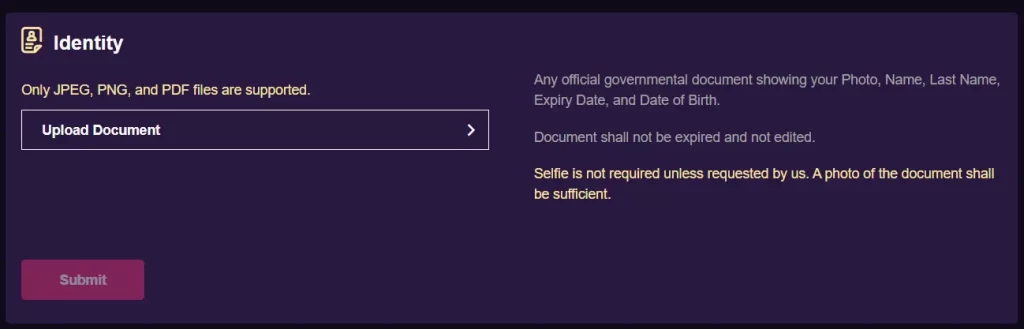
VegasNow verification (KYC) confirms that the account holder is the person named in the profile. The VegasNow casino may request it at any time, and it is usually required before the first withdrawal. Documents are uploaded through the account menu, where the status of each check is also shown.
- Proof of identity: passport, Canadian driver licence or government-issued ID card. The photo and all four corners must be visible.
- Proof of address: utility bill or bank statement issued within the last three months, showing your full name and the address entered at registration.
- Proof of funds: bank statement, e-wallet statement or debit card details. Hide the middle digits of the card number and keep the first six and last four visible.
- Matching data: the name, date of birth and address in the documents must match the profile. A mismatch is the most frequent reason for rejection.
Files should be in colour, uncropped and readable. Screenshots and edited images are usually declined. Review time depends on the queue; the account menu shows when a check is complete.
Eligibility Rules for a VegasNow Account
The VegasNow casino accepts a registration only if the applicant meets the conditions in its terms. Breaking them can lead to account closure and cancellation of any balance or bonus.
| Condition | Rule |
|---|---|
| Age | 18 years or older at the time of sign-up |
| Residence | A country where the operator accepts players; Ontario (Canada) and other restricted regions are excluded |
| Number of accounts | One account per person, household, email, phone number and payment method |
| Personal data | Real and current information that matches official documents |
| Payment methods | Only methods registered in the account holder’s own name |
| Self-exclusion | Applicants on an active self-exclusion list should not register |
The security team checks for duplicate profiles and false data. Accounts that fail these checks may be suspended until the issue is resolved with support.
VegasNow Sign-Up Errors and How to Resolve Them
Most failed registrations are caused by a form entry, a blocked message or a connection problem. Check the items below before contacting support.
- Form will not submit: a required field is empty or formatted incorrectly. Look for fields marked in red and enter the phone number with the +61 country code.
- Email already in use: an account with that address exists. Use the password reset option instead of creating a new profile.
- Age check failed: the date of birth was entered in the wrong order. Use the format shown in the field.
- No welcome email or SMS: check the spam and promotions folders, confirm the address and number in the profile, and wait a few minutes before requesting a new message.
- Page freezes or reloads: the connection dropped. Switch to a stable network, clear the browser cache and restart the form.
- Account blocked after sign-up: the system flagged a possible duplicate or data mismatch. Contact support and be ready to provide documents.
VegasNow support is available 24/7 through live chat, which starts with a chatbot and transfers to an agent on request. Email replies are sent within 12 hours.
VegasNow Casino Registration: Questions and Answers
How long does the VegasNow Casino sign up take?
Filling in the form takes about three to five minutes. Document verification is a separate step and can take longer.
Is a deposit required to complete registration?
No. The account is created when the form is submitted. The deposit page opens afterwards, but payment is optional.
Can I register without a phone number?
No. A phone number is a required field and may be used to confirm the account or to contact you about security.
Do I need a separate account for mobile?
No. The same login works in a desktop browser and on the mobile site.
Can I open a second account?
No. Only one account per person is allowed. Duplicate profiles may be closed.
What if I made a mistake in my personal details?
Contact support through live chat or email. Name and date of birth usually cannot be edited in the profile without a request.


